Microcosmos (Portal)
Microcosmos is a web portal that allows authorized users to view and manage their Illumio-protected application scopes.
Architecture (high level)
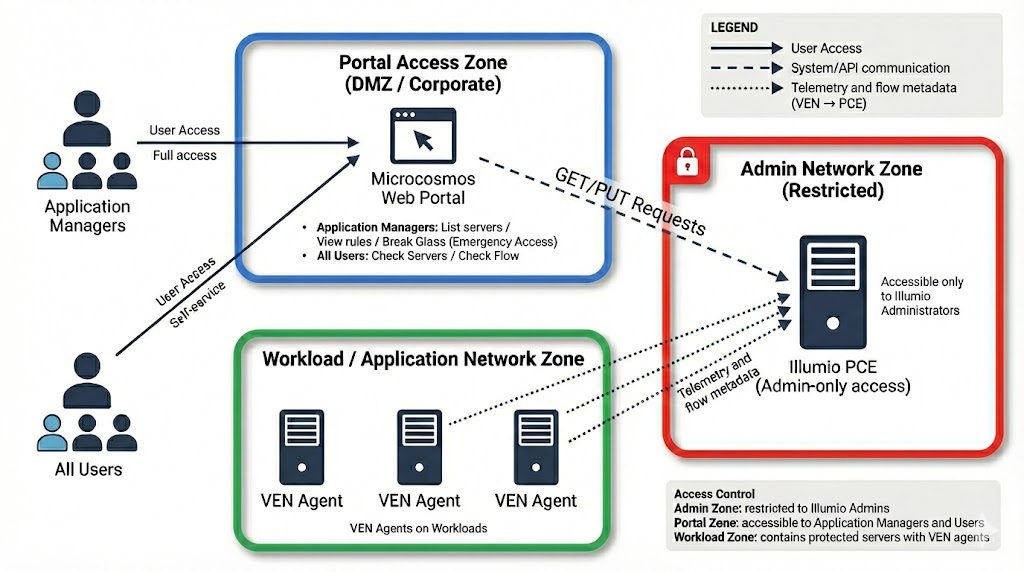
Microcosmos is in the corporate/DMZ zone. It queries the Illumio PCE (admin zone) and shows telemetry from VEN-protected workloads.
What you can do (Application Manager)
- My Applications: view your protected scopes (access-controlled).
- My Servers: list servers per scope, Protect / Unprotect, export server list to Excel.
- My Rules: view microsegmentation rules for your scope, export rules to Excel.
Break Glass (business first)
Use Break Glass when legitimate traffic is blocked and the priority is to restore service quickly:
- Temporarily suspends enforcement for a scope (controlled emergency access).
- Must be used as a short-term action, followed by rule remediation.
Governance for Protect / Unprotect
Because these actions are highly impacting, Microcosmos requests a ticket number:
- Unprotect → Incident (Unity ticket)
- Protect → Change (Unity ticket)
Access model (aligned with IAM)
Authorization aligns with IAM Platform scopes:
psg_read→ read-only accesspsg_write→ Protect/Unprotect and write actions
Auditor access is read-only with wider visibility (compliance checks), without Protect/Unprotect.
➡️ Access procedure (to be completed): Request the required IAM scopes
Screenshots (placeholders)
Screenshot — My Applications by Environment
File to add: assets/images/microcosmos/screenshots/my-applications-by-environment.png
Caption: Application scopes grouped by environment (access controlled).
Screenshot — My Servers
File to add: assets/images/microcosmos/screenshots/my-servers.png
Caption: Server list for a scope; Protect/Unprotect and Excel export.
Screenshot — My Rules
File to add: assets/images/microcosmos/screenshots/my-rules.png
Caption: Rules visible for the scope; Excel export.